How AI Is Changing Surf Photography (And How to Protect Your Work)
Published 2 July 2026
The rise of AI image generation has changed the conversation around photography in ways that are still unfolding. For surf photographers who sell their work online, understanding what the risks actually are — and what protections exist — is increasingly important.
This isn't a panic piece. Most surf photographers selling photos of local sessions aren't immediate targets for large-scale AI training. But the landscape is shifting, and knowing what tools exist to protect your work costs nothing.
The actual risk for surf photographers
To be concrete about what's happening: AI image generation models (Midjourney, Stable Diffusion, DALL-E, and others) are trained on large datasets of images scraped from the internet. If your work is publicly visible online, it may have already been included in training data.
The risk isn't that someone will steal a specific photo of a specific surfer — that's a separate copyright issue. The risk is that:
- Your visual style, lighting approach, and compositional choices get absorbed into models that can then generate similar-looking images
- Your photos are used as training data without your consent or compensation
- AI-generated "surf photography" begins to compete with the real thing in stock photo markets
For photographers who sell commercially (stock photos, brand work), this is a live concern. For photographers who primarily sell photos back to the subjects (the Onda model), the immediate commercial risk is lower — an AI can't generate a specific photo of you on your local wave.
C2PA: the technical standard that matters
The Coalition for Content Provenance and Authenticity (C2PA) is an industry standard backed by Adobe, Google, Microsoft, the BBC, and others. It's a way of cryptographically embedding metadata into a photo that:
- Asserts authorship: Who made this image, with what device, when
- Records edit history: What tools were used to process it
- Includes rights assertions: Statements about how the image may be used
The most relevant assertion for photographers is the "Do Not Train" assertion — a machine-readable signal that tells AI systems not to use this image for model training.
Is "Do Not Train" legally binding? Currently no — it's a voluntary standard. But it's increasingly supported by major AI companies (Google, OpenAI, and others have committed to respecting it), and it's likely to become more significant as AI regulation develops in Europe and the US.
AI-resistant watermarks on Onda
Onda doesn't currently attach C2PA content credentials to uploaded photos, so treat the standard above as an industry direction worth watching rather than a live Onda feature. What Onda applies today, automatically on every upload, is dynamic watermarking designed to be resistant to automated removal tools.
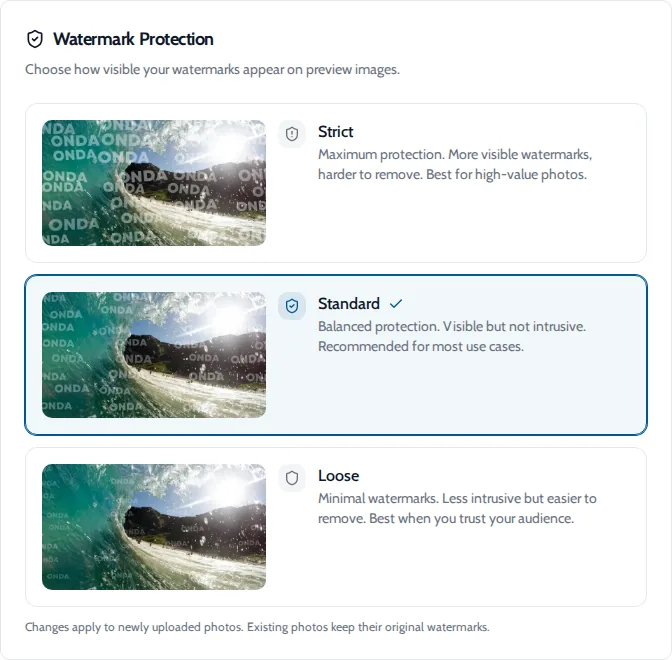
Traditional watermarks are often defeated by AI inpainting — tools that detect the watermark pattern and fill it in with generated content. Onda's watermarks use random variations in position, scale, rotation, opacity, and geometric warp on each image. This variability makes it significantly harder for automated tools to detect and remove the watermark pattern.
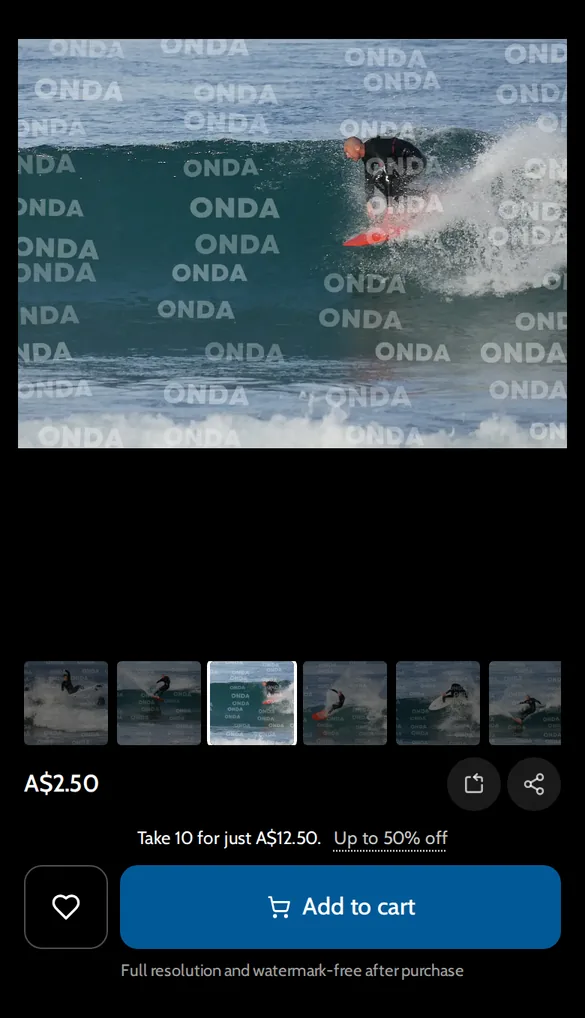
This protects the commercial value of your previews — the watermarked versions stay watermarked even if someone tries to clean them up.
Other practical steps to protect your work
Register copyright on your best work. In the US, registering copyright (via the Copyright Office) gives you legal tools that unregistered work doesn't have — specifically, the ability to claim statutory damages and attorney's fees in infringement cases. The process is inexpensive and can cover batches of photos.
Add copyright metadata in Lightroom. In Lightroom's Library module, there's a Metadata panel where you can embed copyright information in the EXIF/IPTC data of exported files. This doesn't prevent scraping but creates a clear record of authorship.
Use your name in filenames. Files named yourname_hossegor_oct2025_001.jpg are more traceable than DSC_0001.jpg.
Monitor with reverse image search. Google Image Search, TinEye, and Pixsy (which automates this and pursues infringement on your behalf) let you see where your images are being used without permission.
Be strategic about what you post publicly. Your best commercial work doesn't need to live at full resolution on public platforms. Post previews, save originals for clients.
The bigger picture
The legal and technical landscape around AI and photography is moving fast. The EU AI Act, ongoing US copyright cases involving AI training data, and the rapidly evolving positions of major AI companies all point toward a more regulated environment in the next few years.
For now, the practical steps above — strong watermarking, metadata embedding, copyright registration for key work — represent reasonable protection without requiring significant time or cost.
The photographers most at risk are those doing nothing. The tools exist to protect your work; using them is a professional habit worth building.
For the full picture on selling your work online while protecting it, see our guide to selling surf photos and the platform comparison.
Onda applies AI-resistant watermarks to every photo you upload →